ATRIO MK II Password Recovery: A Game-Changer in Digital Forensics
The Challenge of Password-Protected Files
In digital forensics, encountering password-protected files is a common hurdle. Investigators often deal with encrypted documents, compressed archives, and protected storage formats that can impede access to critical evidence. Traditional methods of recovering these passwords involve brute force attacks, dictionary attacks, or leveraging open-source tools. However, these methods are time-consuming, require significant computational power, and may not always be successful.
ATRIO MK II’s Password Recovery Feature
ATRIO MK II simplifies and accelerates the password recovery process by utilizing a pre-compiled password list of over 14 million unique passwords. It automatically attempts to recover passwords for various file types, including:
Document files: Microsoft Office and Adobe PDF
Compressed archives: ZIP, RAR, and 7z
Encrypted files: GNU Privacy Guard (GPG)
After the process completes, ATRIO generates two output files in the DOCUMENTS folder:
PASSWORDS_RECOVERED.txt – Lists successfully cracked passwords alongside their corresponding files.
PASSWORDS_RECOVERED_ALL_ATTEMPTS.txt – Provides a comprehensive log of all hashed files, including those that could not be cracked.
It’s important to note that ATRIO does not unlock the password-protected files. Instead, it retrieves and logs the passwords, allowing investigators to access the content manually.
How to Enable Password Recovery in ATRIO MK II
Navigate to AI-ASSIST > PASSWORD RECOVERY from the main menu.
Select the option until the button outline turns green.
Press the BACK button.
When ready, press the GO button to start the process.
Password recovery can be time-intensive, so it is advisable to run this process when ample processing time is available.
Manual Password Recovery Methods Using Open-Source Tools
Before ATRIO MK II, forensic examiners relied on various Linux-based open-source tools for password recovery. Let’s explore some commonly used methods:
1. John the Ripper
John the Ripper is a powerful password-cracking tool that uses dictionary and brute force attacks.
Steps:
Install John the Ripper:

Generate a password hash from the protected file:

Crack the password:

2. Hashcat
Hashcat is an advanced password recovery tool that utilizes GPU acceleration for faster processing.
Steps:
Extract the password hash:

Run Hashcat with a wordlist:

3. PDFCrack
For password-protected PDFs, PDFCrack is a lightweight tool for dictionary attacks.
Steps:
Install PDFCrack:

Run the tool with a dictionary:

4. GPG Password Recovery with GPG2John
For GPG-encrypted files, use GPG2John in combination with John the Ripper.
Steps:
Extract the hash:

Use John to crack it:

ATRIO MK II vs. Manual Methods: A Comparison
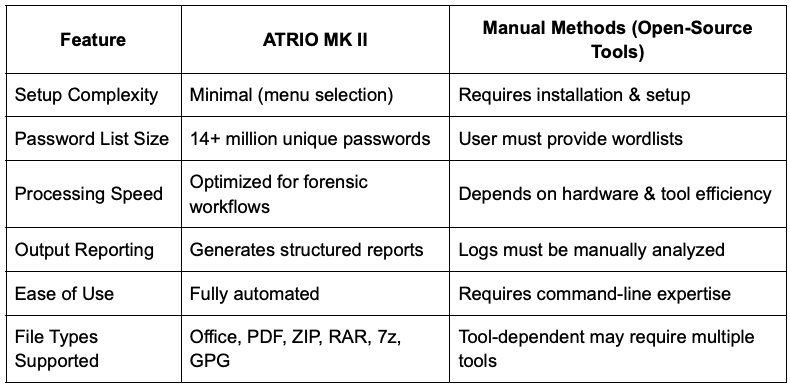
Why choose ATRIO MK II?
For forensic professionals, efficiency is key. ATRIO MK II eliminates the need for multiple tools, complex configurations, and manual intervention. With its extensive password list and automated processing, investigators can quickly determine if protected files are accessible, significantly reducing investigation times.
By integrating password recovery directly into the forensic workflow, ATRIO MK II enhances productivity and ensures that valuable time is spent analyzing evidence rather than troubleshooting technical hurdles.
Conclusion
While open-source tools remain valuable for forensic analysis, ATRIO MK II’s password recovery feature provides digital investigators with an all-in-one, user-friendly solution. Its streamlined approach, comprehensive reporting, and built-in efficiency make it an indispensable tool in the forensic toolkit. Whether dealing with encrypted documents, compressed archives, or protected data, ATRIO MK II ensures that access to critical information is faster and more reliable than ever before.
To learn more about ATRIO MK II and its capabilities, contact us today for a demo!